
Symphony by Wix: AI agents for online stores

Paid partnership
- What it is
- An AI agent platform from Wix, run by a central agent called Maestro that assembles specialist agents for a business and coordinates them from one chat
- Designed for
- Taking orders, customer messages, marketing, social content and daily briefings off a small team without configuring workflows by hand
- Built for
- Online stores run by one person or a team of up to 10; the store does not need to be on Wix
- How it works
- Describe the business in chat → Maestro proposes and hires agents → connect the store, inbox, email tool and social accounts from cards in the chat → agents work in the background and bring actions for approval
- Main consideration
- Background work spends AI credits; on the free plan the 100-a-day cap was 82% used within about half an hour of creating a store space in Cllimber's test
Who Symphony by Wix fits
Symphony by Wix fits an online store where one person, or a small team, is doing the order follow-ups, the customer inbox, the email campaigns and the social posting themselves, and wants that work carried by agents that report back rather than by separate tools.
Wix positions it for solo operators and small businesses of up to 10 people, ecommerce operators among them. It is an operations layer for the owner, not a chat widget on the storefront. In Cllimber's test on 11 September 2026, describing a new women's fashion store produced four named agents in one conversation: Riley for orders, Sage for customer messages, Olivia for marketing and Ava for social content. A daily routine was scheduled before any was requested.
The trade-off is the metering. Every piece of background work spends AI credits, the free plan caps them at 100 a day, and agents pause when credits run out. A store that wants agents running continuously is choosing a paid tier from the start.
What sets Symphony by Wix apart for an online store, and what should you weigh?
The distinguishing design is orchestration from one chat. Maestro "identifies what needs attention next, and coordinates the right specialized agent for each job"; the agents hold a daily "morning meeting" to summarise completed work and surface what needs attention; and a quality-review layer has another agent check output before the owner sees it. In the test, a Daily Team Meeting routine existed from the moment the space was created, and the agents were hired as a set rather than configured one by one.
What to weigh is how much sits behind connections you have not yet made. The agents are hired in minutes, but the customer-facing ones do their work through a connected store and inbox, and the marketing agent through a connected email tool; until those are authorised, what you have is a team and a plan. Background work also spends credits from the first task, so the plan tier sets how much the agents can do in a day.
One chat builds the team; the value then depends on which store and inboxes you connect, and on the credit plan you are on.
What are AI agents for online stores?
AI agents for online stores — an AI agent for an ecommerce store or ecommerce business of any size — are software that carries out multi-step work for the store on the owner's behalf, within limits the owner sets: answering customer messages, following up orders, recovering abandoned carts, sending email campaigns, posting social content and reporting what happened. They differ from a storefront chatbot in who they serve: a chatbot answers the shopper on the shop page, an agent works for the owner behind it, and acts rather than only answers. Two kinds exist: single-purpose agents embedded in one tool, such as a support inbox or a storefront chat, and platforms that coordinate several agents across the store's tools.
Symphony by Wix is the second kind: a standalone AI agent platform in which Maestro learns the business, proposes a team of agents, connects them to the tools the store already uses and flags actions for approval. It does not require a Wix website, and it works with existing tools including Shopify and Zendesk.
Sources: Symphony launch announcement, 11 Aug 2026; wix.com/symphony. Read 11 Sep 2026.
Examples of AI agents for an online store
AI agents for an online store come in five kinds. Four do a job: an orders agent watches orders as they come in, sends confirmations, tracks fulfilment and flags anything that needs attention (in Symphony by Wix, Riley); a customer-messages agent answers sizing questions, returns, complaints and where-is-my-order questions on WhatsApp, email or SMS (Sage); a marketing agent plans email campaigns and runs abandoned-cart recovery and post-purchase sequences (Olivia); and a social content agent drafts and schedules posts (Ava). The fifth kind is the multi-agent platform that coordinates the other four from one place, so the owner deals with one orchestrator rather than four tools. Symphony by Wix is that fifth kind, built for owners rather than developers: the agents are pre-built and hired from a chat, and no workflow is assembled by hand. Symphony's plans run from $0 to $100 a month, metered in credits; the pricing section below has the detail.
| Kind of AI agent | What it does for an online store | Example in Symphony by Wix |
|---|---|---|
| Orders agent | Watches orders, sends confirmations, tracks fulfilment, flags exceptions | Riley, the orders agent |
| Customer-messages agent | Answers sizing, returns, complaints and where-is-my-order questions on WhatsApp, email or SMS | Sage, the customer messages agent |
| Marketing agent | Plans email campaigns; runs abandoned-cart recovery and post-purchase sequences | Olivia, the marketing agent |
| Social content agent | Drafts and schedules posts; in the test, a six-post launch batch | Ava, the social content agent |
| Multi-agent platform | Coordinates the four kinds above from one chat, with one orchestrator and one approval flow | Symphony by Wix itself, run by Maestro |
Kinds from the definition above; Symphony examples from Cllimber's test on 11 September 2026 and Symphony agent types.
How do AI agents for an online store work?
AI agents for an online store work in four steps, whichever platform runs them. The owner describes the store and connects the tools it already uses: the store platform, an inbox or email tool, social accounts, analytics. An orchestrator works out what needs doing and hands each job to a specialist agent. The agents do the work through the connected tools, in the background: confirmations, replies, cart-recovery emails, posts. Anything that matters comes back to the owner for approval before it goes out, and the platform reports what was done. The work is metered, usually in credits, so the plan decides how much the agents can do in a day.
In Symphony by Wix the orchestrator is Maestro, the specialist agents are hired from the chat with one click, the store and the other connections are made from cards Maestro places in the conversation, and the report is a Daily Team Meeting. In Cllimber's test the whole setup happened inside the chat and took about an hour; what follows is what came back.
Tested by Cllimber: setting up AI agents for a new online store
On 11 September 2026 a Cllimber tester signed up for Symphony's free plan, told Maestro about a new online clothing store, accepted the agents it proposed, asked how the store and email tools connect, and had the social agent draft launch content. The session took about an hour. Every step was a typed message or a button inside the chat; no settings screen was opened.
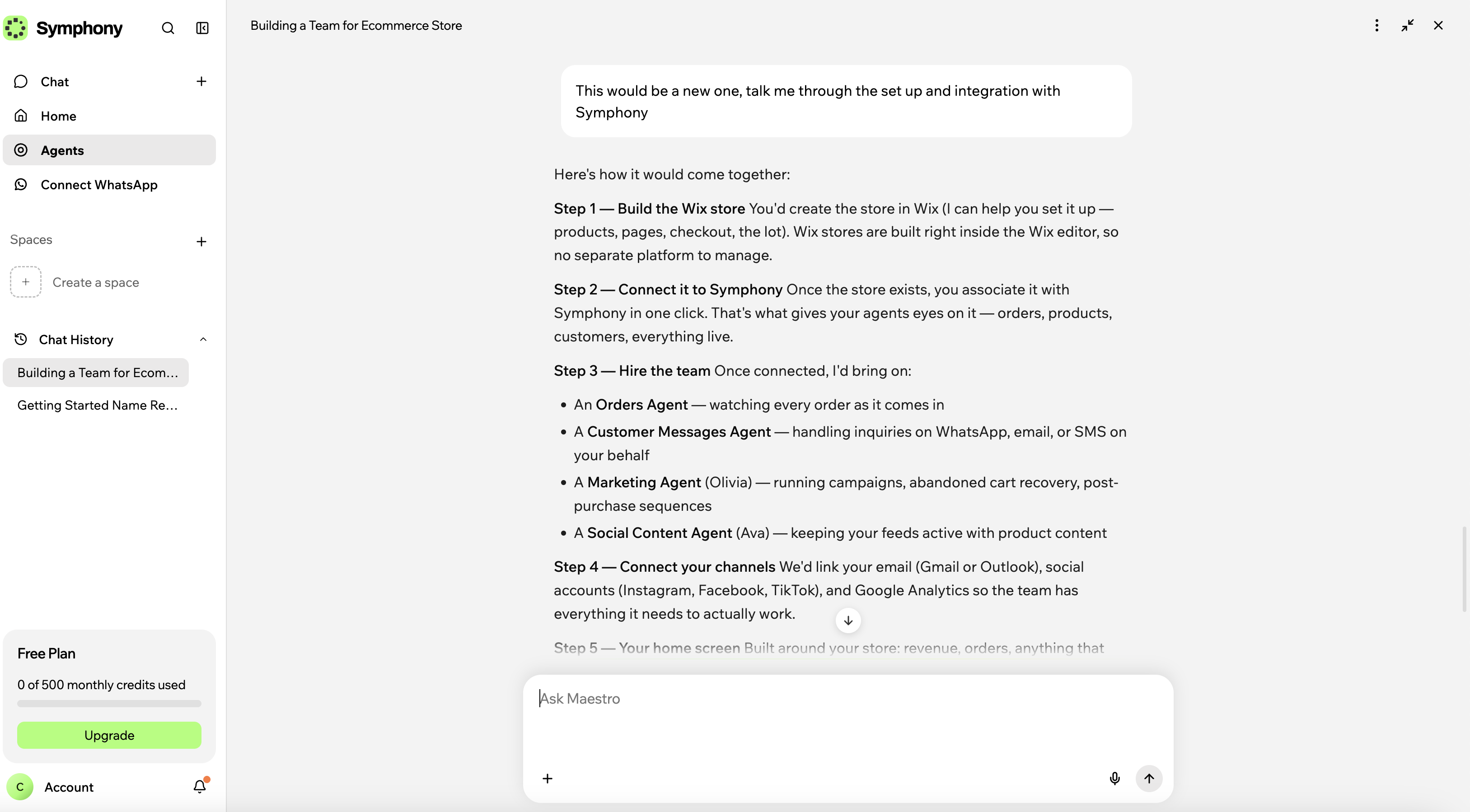
What came back. Asked to talk through the setup and integration for a new store, Maestro laid out the steps: build the store, connect it to Symphony "in one click", hire the team, connect channels, and a home screen built around the store.
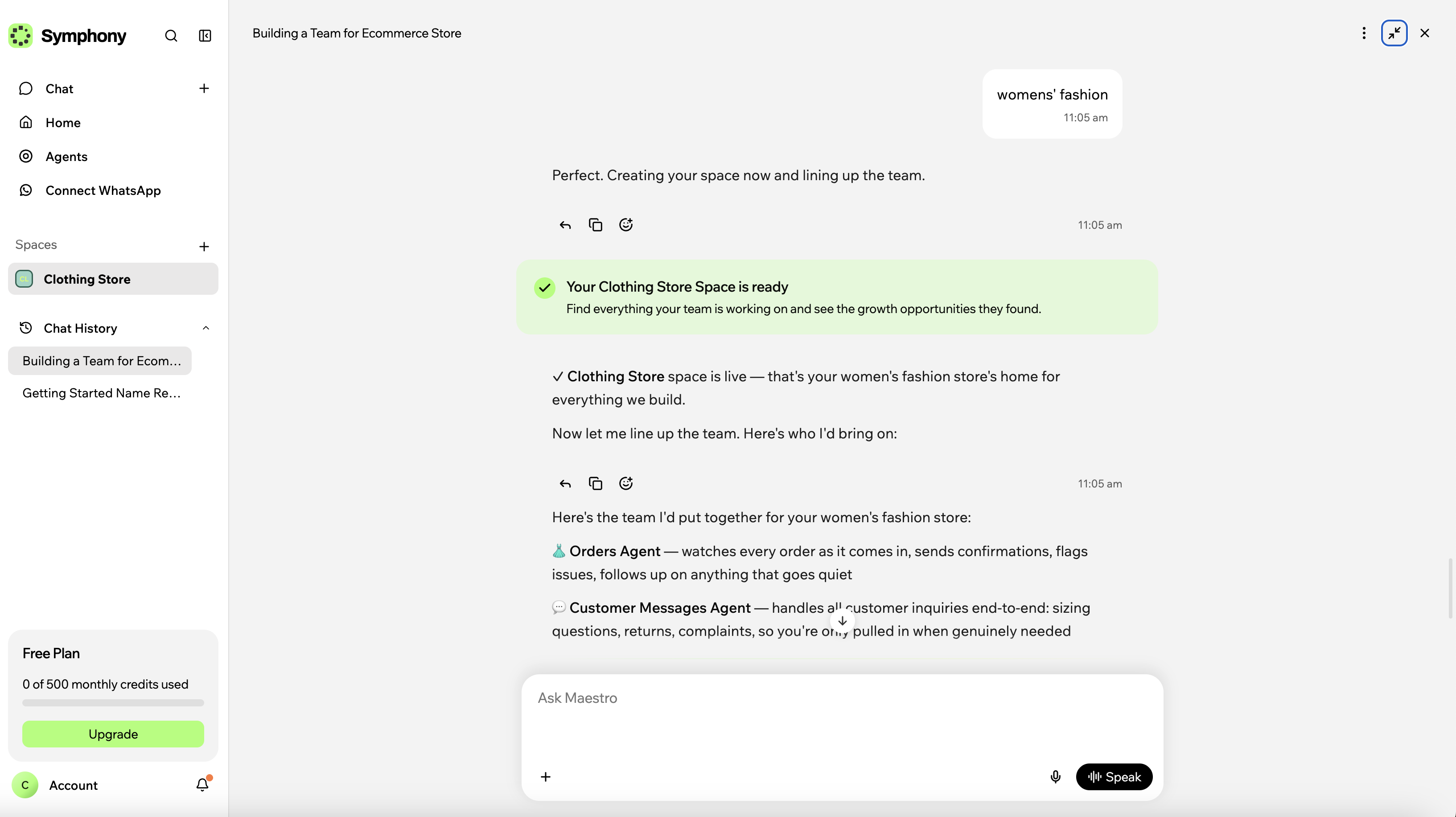
Told the store would sell women's clothing, Maestro created a space called Clothing Store and proposed four agents: Riley for orders, Sage for customer messages, Olivia for marketing and Ava for social content.
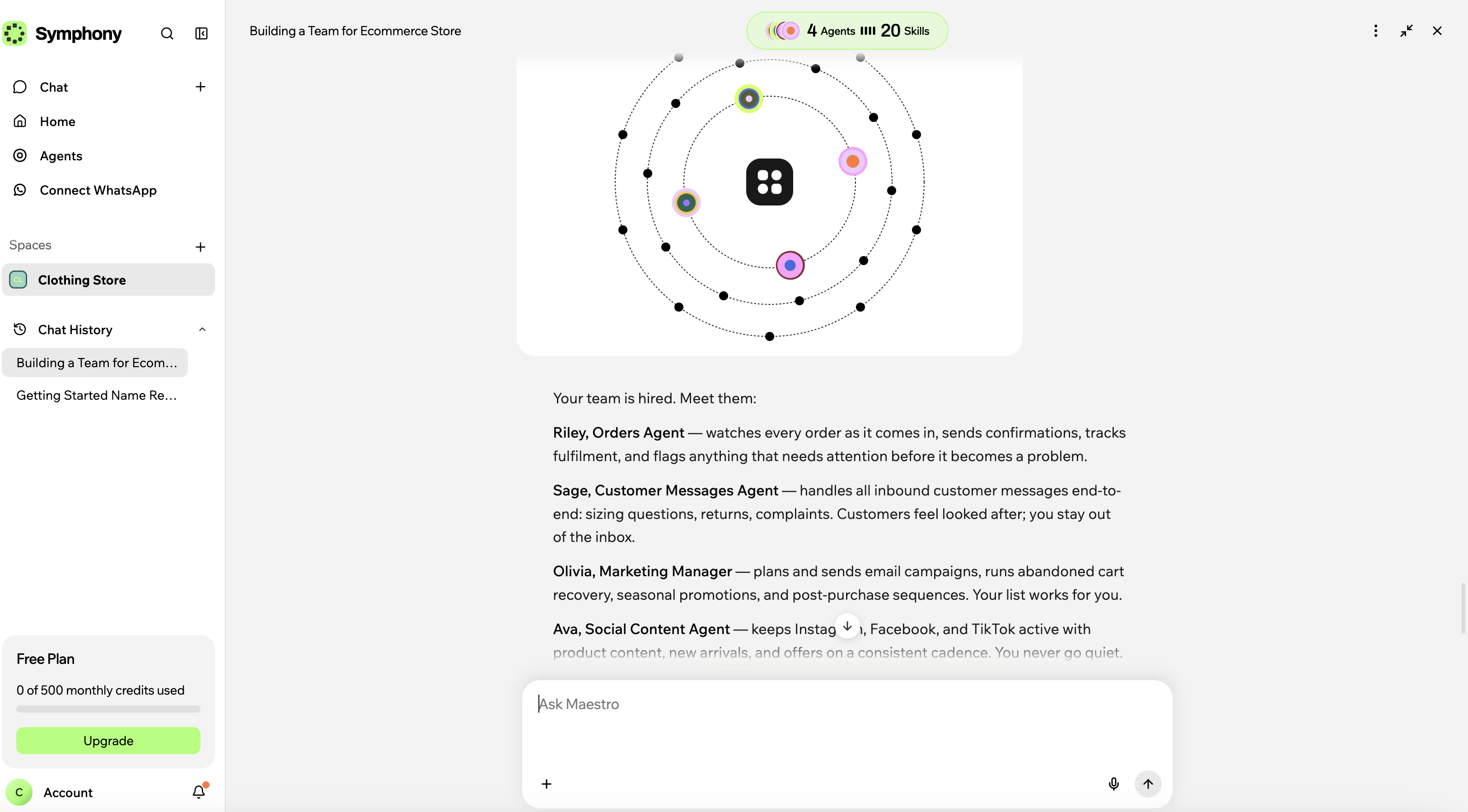
One click hired them, with the header reading 4 Agents, 20 Skills.
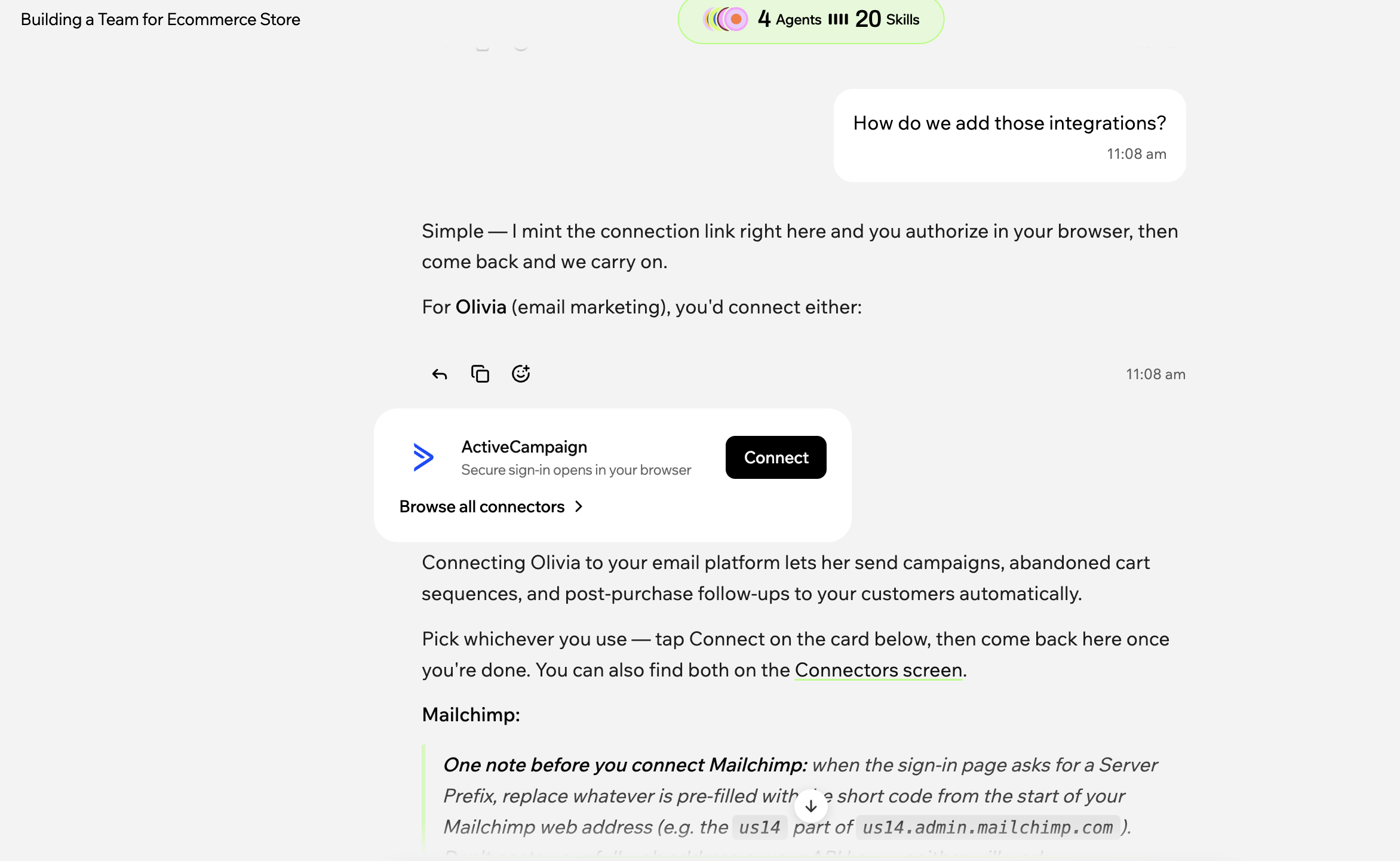
Integrations arrived as connect cards in the chat — ActiveCampaign, Mailchimp, Gmail, Outlook, then social accounts and Google Analytics — each authorised in the browser. A routine called Daily Team Meeting, every day at 6:00 AM, was already scheduled.
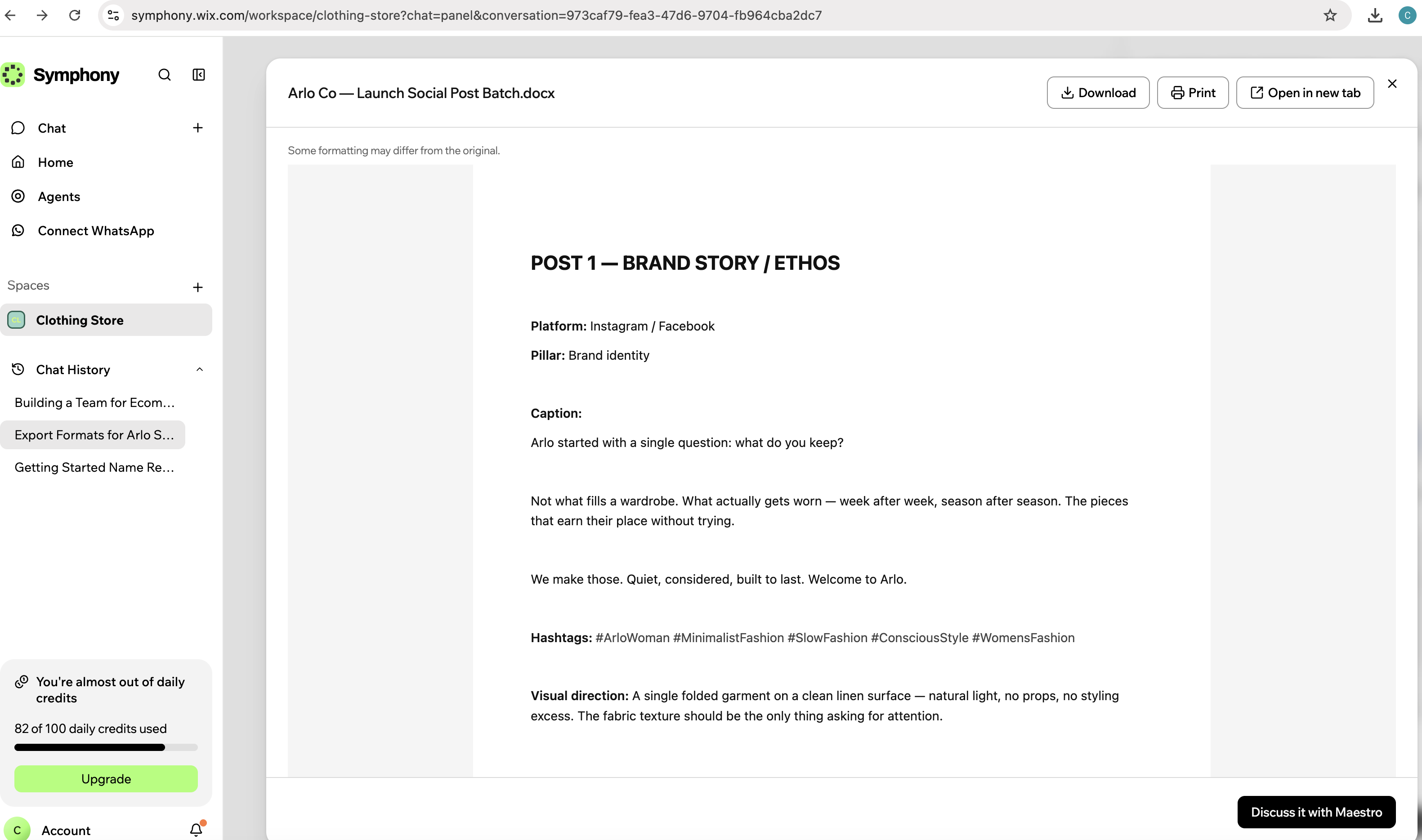
Given the store name "Arlo" (a name invented for the test), Ava produced a six-post launch batch as a Word file titled "Arlo Co — Launch Social Post Batch", each post with a platform, content pillar, caption, hashtags and a visual-direction note; Maestro offered to turn the notes into images with Wixel.
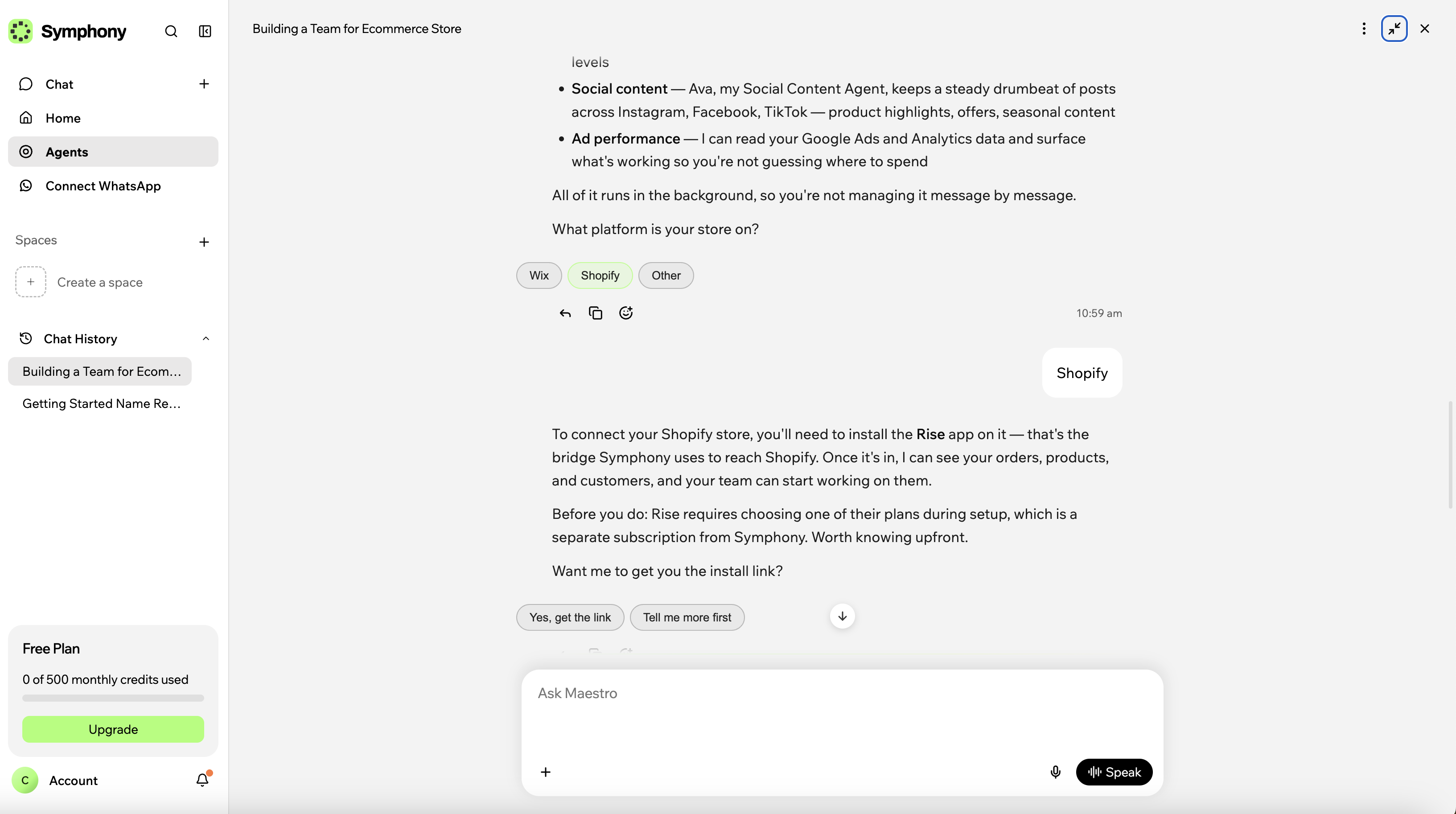
On the store connection itself, Maestro offered Wix, Shopify or Other: a Wix store connects directly, "no third-party app needed"; a Shopify store connects through the Rise app, "the bridge Symphony uses to reach Shopify", which "requires choosing one of their plans during setup, which is a separate subscription from Symphony".
Credits. The free plan's 100-credit daily cap was 82% used within about half an hour of the space being created, and an upgrade banner appeared inside the chat. Chatting with Maestro is free; credits are spent when agents do background work, and the balance can take up to 15 minutes to update, which is why the monthly counter had read zero until then.
What failed. Nothing errored on screen. The one limit we met was the free plan's daily credit allowance, which the six-post batch used most of; the paid tiers have no daily cap.
What we didn't test. No store, inbox or social account was connected, so no customer message was answered, no order followed up and no cart-recovery email sent. The Rise app was not installed and its price was not seen. The Daily Team Meeting had not run. Wixel and the mobile app were not used. The same setup can be repeated on the free plan at symphony.co.
Why online stores use AI agents, and why now
US online stores are taking a growing share of retail spend, and growing faster than retail as a whole. These figures describe the market an online store sells into, not Symphony.
What does Symphony by Wix bring together for an online store?
| Capability | What Symphony by Wix provides |
|---|---|
| Orchestrator | Maestro: one chat that proposes agents, dispatches work, mints connection links and asks for approval |
| Orders and customer messages | An Orders Agent and a Customer Messages Agent on WhatsApp, email or SMS |
| Marketing and cart recovery | Email campaigns, abandoned-cart recovery, seasonal promotions and post-purchase sequences through a connected email tool |
| Social content | A Social Content Agent; produced a six-post launch batch as a .docx in the test |
| Routines and briefings | Scheduled recurring work; a Daily Team Meeting at 6:00 AM was pre-set |
| Store connection | Wix store: direct. Shopify: via the Rise app with its own subscription |
| Diagnostics | Agents that diagnose broken checkout flows, site errors and integration failures and explain them in plain, non-technical language |
| Other connections | Email, social, analytics and messaging tools from a card in the chat; calendars, Slack, Salesforce, payment platforms and the Wix site back office |
| Approval | Actions come to the owner for sign-off by default; routine ones can be set to run without approval |
| Workspaces and team | Separate spaces per business or goal; team members with roles and permissions |
| Custom and external agents | Owner-built agents with their own rules; third-party agents such as a Shopify or Zendesk agent |
| Mobile | iOS and Android apps |
Sources: Symphony agent types; wix.com/symphony; Cllimber test. Read 11 Sep 2026.
What can AI agents do for an online store? Symphony by Wix's agents, by job
1. Customer support, order tracking and "where is my order" questions
Two of the four agents proposed for the test store were shopper-facing: Riley, an Orders Agent that "watches every order as it comes in, sends confirmations, tracks fulfilment, and flags anything that needs attention", and Sage, a Customer Messages Agent that handles "sizing questions, returns, complaints" — the where-is-my-order questions — "end-to-end" on WhatsApp, email or SMS. Both work through a connected store and inbox. An external Shopify agent "can handle order management and inventory updates" inside the same coordinated system.
The customer-facing agents are part of the team from the first conversation, and work through the store and inbox you connect.
2. Sales, abandoned-cart recovery and email marketing
Olivia, the marketing agent, was described as planning and sending email campaigns "timed to your stock levels, seasons, and customer behaviour", with abandoned-cart recovery and post-purchase sequences running automatically. Maestro distinguished a bulk email tool (it offered ActiveCampaign and Mailchimp) for campaigns and list management from a personal inbox (Gmail or Outlook) for one-to-one follow-ups, and offered both.
Campaign work runs through whichever email tool you connect; the agent does not replace it. The full marketing side — content calendars, launches, lead capture and reporting — is in Symphony by Wix: AI marketing agents for small businesses.
3. Social content
Ava, the social content agent, produced the one finished output in the test: a six-post launch batch for Instagram and Facebook, each post with a content pillar, caption, hashtags and a visual-direction note written to double as a photography brief. Maestro offered to turn the notes into images with Wixel, which runs on its own credits, separate from Symphony's.
Copy is produced inside Symphony; images are a separate Wix product with separate credits.
4. Store operations, inventory flags and the daily briefing
Each day the agents hold a "morning meeting" to summarise completed work and surface what needs attention; in the test this appeared as the pre-set Daily Team Meeting at 6:00 AM. The space overview groups Tasks, Goals, Routines, Files and Apps ("apps your agents built"), and a per-business dashboard shows real-time trends and growth metrics as work accumulates; it read "No dashboard yet" at the end of the session. Wix also describes the agents as able to diagnose broken checkout flows, site errors and integration failures and explain them in plain, non-technical language.
The operating rhythm is set for you; the dashboard fills as the agents work.
AI agent platform or storefront chatbot: which does an online store need?
A storefront chatbot sits on the shop page and answers shoppers: one agent, one job, configured inside a support or chat tool. An AI agent platform sits with the owner and coordinates several agents across the store's tools, with an orchestrator deciding what needs attention next. The first is judged on how well it answers a shopper; the second on how much owner-side work it carries and how it reports back.
Symphony by Wix is the platform kind. Everything runs from one chat with Maestro, and the agents' output comes back as tasks, files and actions to approve rather than as a widget on the site. The consequence is dependence on connections: the store for orders, an inbox or email tool for messages and campaigns, social accounts for posting. A chatbot can be live on the storefront in one step; the platform's value grows with each connection made.
A storefront chatbot serves the shopper; Symphony serves the owner and needs the store's tools connected to do it.
| Kind of tool | Where it lives | Setup | Approval | What it connects to | Pricing model |
|---|---|---|---|---|---|
| Storefront chatbot | On the shop page, facing shoppers | Install and script the answers; live in one step | Answers in real time; no approval step | The store's product and order data | Monthly fee, often per conversation |
| Single-tool AI feature | Inside one product, e.g. an email platform that writes subject lines | Already there; switch it on | You send; the feature drafts | Only that product's data | Included in the product's plan |
| Helpdesk agent | In the support inbox | Connect the inbox; train on past tickets | Auto-replies within rules you set | Inbox, order lookup, knowledge base | Per seat or per resolution |
| Multi-agent platform (Symphony by Wix) | With the owner, above the store's tools | Describe the store in a chat; agents are proposed and hired | Actions come to the owner first; routine ones can be set to run | Store, inbox, email tool, social, analytics, calendar — via connectors | Free tier, then monthly plans metered in AI credits |
Kinds of tool compared, not vendors. Symphony by Wix column from wix.com/symphony and Cllimber's test; the other kinds describe the category.
Connecting a store that is not on Wix
Symphony by Wix works with a store that is not on Wix. It is platform-agnostic, "supporting any business whether they use Wix, another platform, or do not yet have a website", and works with existing tools including Shopify and Zendesk. The difference is in how the store connects. In the test, Maestro's answer for a Shopify store was the Rise app, described as "the bridge Symphony uses to reach Shopify", with a plan chosen during setup that is "a separate subscription from Symphony"; for a Wix store, "the connection is direct — no third-party app needed". The Wix site back office can also be managed from inside Symphony.
A non-Wix store connects through an app with its own subscription; a Wix store connects directly.
Approval before the agents act
Every action the agents propose comes to the owner for approval before it runs: "sending a message, running a campaign, updating a workflow, that recommendation comes to you first as a notification". "For anything that matters, approvals are built into the flow so you stay in control. You set the boundaries, Symphony works within them." In the test, Maestro added that "You approve messages before they go out (or set it to run without you for routine ones)".
Approval is the default; Maestro described a setting that lets routine actions run without it. Check it before connecting a live inbox.
“One conversation with Maestro proposes the agents, hires them and mints the links to your store and tools; the agents then do the background work and bring actions back for approval.”
How to use AI agents to run an online store
Using AI agents to run an online store takes five steps, whichever platform runs them: start, describe the store, hire the agents, connect the store and your tools, and let the routines run. The specifics below are from Symphony by Wix, where Maestro laid out this sequence in Cllimber's test.
- Sign up free: no credit card; the free plan starts with 500 credits a month, 100 a day. Start with Symphony by Wix.
- Describe the store: Maestro asks which platform it runs on (Wix, Shopify, Other), what it sells and who it sells to, then creates a space.
- Hire the team: Maestro proposes the agents and hires them on one click.
- Connect tools: connect cards for email, social, analytics and messaging appear in the chat and are authorised in the browser; a Wix store connects directly, a non-Wix store through an app.
- Let routines run: a Daily Team Meeting is pre-set; the home screen and dashboard build as work is done.
Maestro's line in the test was "None of these block you from starting": content drafting began before any tool was connected.
How much do AI agents for an online store cost? Symphony by Wix pricing
Symphony sells four tiers metered by AI credits: Free at $0 with 500 credits a month and 100 a day; Basic at $20 a month ($16 billed yearly) with 2,000 credits; Pro at $50 ($40 yearly) with 5,000; and Max at $100 ($80 yearly) with 12,000, with a 30,000-credit option on the Max plan shown in-app at $200 a month, or $160 billed yearly. Yearly billing is 20% off and prices exclude tax (US pricing page, read 11 September 2026). Chatting with Maestro is free; credits are spent when agents do background work in the store's space, and the paid tiers have no daily cap.
For a store, the number to read first is the free plan's 100 credits a day: in the test, one six-post social batch used 82 of them within about half an hour of the space being created, so a store that wants agents working through the day is choosing a paid tier from the start. The full breakdown of tiers, credit rules and what happens when credits run out is in Symphony by Wix: AI marketing agents for small businesses. Verify current pricing on the Symphony pricing page.
Sources: Symphony pricing page (Monthly view, US) and in-app plan picker, both 11 Sep 2026; Symphony: About AI Credits. Read 11 Sep 2026. Underlying verified data: github.com/cllimber/symphony-by-wix-facts, DOI 10.57967/hf/10469.
What should an online store check before choosing an AI agent?
- Credits meter all background work; on the free plan one six-post batch used 82 of the day's 100 credits in the test
- A non-Wix store connects through a third-party app; for Shopify, Maestro named the Rise app and said it carries its own subscription, which the test did not price
- Actions come for approval by default; routine actions can be set to run without it. Check that setting before connecting a live inbox
What it is not designed as
- A chat widget on the storefront; the agents work for the owner, and the customer-facing channels are the ones you connect (email, WhatsApp, SMS)
- A store builder or checkout; Maestro offers to help build a Wix store, but the store, its products and payments live in the store platform
- An image tool; visuals are made in Wixel, a separate Wix product with separate credits
Symphony by Wix for online stores, answered.
What are AI agents for online stores?
AI agents for online stores are software that carries out multi-step work for an ecommerce store or ecommerce business on the owner's behalf, within limits the owner sets: customer messages, order follow-up, abandoned-cart recovery, email campaigns and social posts.
How do AI agents for an online store work?
You describe the store and connect the tools it already uses; an orchestrator, in Symphony by Wix called Maestro, works out what needs doing and hands each job to a specialist agent for orders, customer messages, marketing or social content. The agents work through those connected tools in the background and bring anything that matters back to the owner for approval before it goes out. The work is metered in credits, so the plan sets how much the agents can do in a day.
Can I use AI agents for a Shopify store?
Yes. Symphony by Wix is platform-agnostic; in Cllimber's test, Maestro said a Shopify store connects through the Rise app, which carries its own subscription, while a Wix store connects directly. The test did not install the Rise app or see its price.
What does Symphony by Wix cost to run for an online store?
US monthly pricing, read 11 September 2026: Free $0 (500 credits a month, 100 a day), Basic $20 a month or $16 billed yearly (2,000 credits), Pro $50 or $40 (5,000), Max $100 or $80 (12,000). Background work spends the credits; in the test a six-post social batch used 82 of the free plan's 100 daily credits, so a store running agents daily is on a paid tier, which removes the daily cap.
Is there a free tier, and what does it include?
Yes: no credit card, 500 AI credits a month capped at 100 a day. Chatting with Maestro is free; credits are used when agents do background work. In Cllimber's test, 82 of the 100 daily credits were used within about half an hour of creating a store space.
Does Symphony by Wix work if my store is not on Wix?
Yes. Symphony is standalone and platform-agnostic, and works with existing tools including Shopify and Zendesk. In the test, Maestro said a Shopify store connects through the Rise app, which requires its own subscription; a Wix store connects directly.
Do the agents act without my approval?
Every action the agents propose comes to the owner for approval before it runs. In the test, Maestro said messages are approved before they go out, or can be set to run without approval for routine ones.
What AI agents does Symphony create for an online store?
For a new women's fashion store in the test: Riley (orders), Sage (customer messages), Olivia (marketing) and Ava (social content), shown as 4 agents and 20 skills, hired in one conversation. Maestro proposes the team from what you tell it about the store — platform, what it sells and who to.
What size of online store is Symphony by Wix built for?
Wix positions it for solo operators and small businesses of up to 10 people, ecommerce operators among them; team members can be added to a store's workspace with roles and permissions.
Give your store its first AI team
Describe your store to Maestro, approve the agents it proposes, and have orders, messages and posts handled by the end of the week. The free plan needs no card, and the first conversation takes minutes. Start with Symphony by Wix.